One of the biggest challenges organisations face when adopting automation is that many business applications don’t provide APIs or modern integration options. As a result, employees still spend countless hours performing repetitive tasks such as entering data, updating records, copying information between systems, or navigating legacy applications.
Microsoft is addressing this challenge with Computer Use in Copilot Studio. Instead of relying on APIs, Computer Use enables AI agents to interact with applications through their user interface, much like a person would. This opens the door to automating processes that were previously difficult or impossible to integrate.
What is Computer Use?
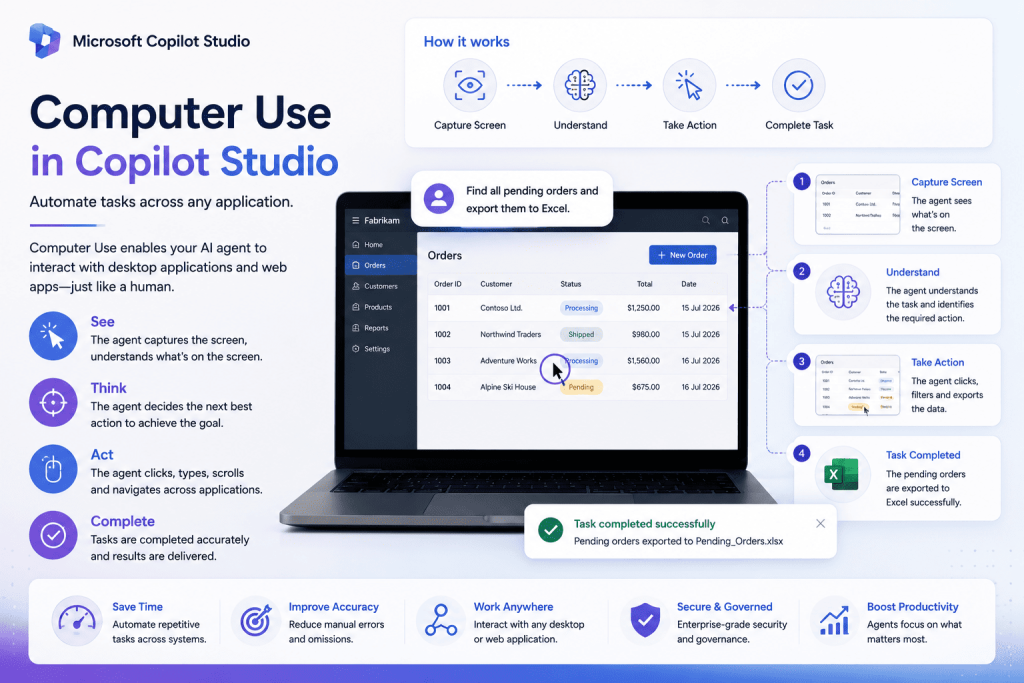
Computer Use is a capability in Microsoft Copilot Studio that allows an AI agent to interact with desktop or web applications by performing actions directly on the screen. Rather than connecting to a system through an API, the agent can click buttons, enter text, select menu options, and navigate interfaces based on the task it has been given.
This makes it possible to automate workflows involving applications that don’t expose traditional integration methods, including many legacy systems.
How does it work?
Once a task is defined, the AI agent observes the application’s interface and determines the actions required to complete it. It can identify input fields, buttons, menus, and other interface elements before interacting with them in sequence.
For example, an agent could open a web portal, sign in using approved credentials, search for a customer, update specific information, and submit the changes without requiring any custom integration.
Because the interaction is based on the application’s interface rather than its underlying technology, Computer Use can work across a wide variety of business applications.
Practical business scenarios
Many organisations still rely on systems that require manual interaction. Computer Use provides an opportunity to automate these repetitive activities while reducing the need for custom development.
A common example is processing customer requests across multiple applications. An AI agent could retrieve information from Dynamics 365, update a third-party portal that doesn’t provide an API, and record the outcome back in Dynamics 365—all within a single automated workflow.
Other scenarios include updating employee information in legacy HR systems, processing finance requests, completing repetitive administrative tasks, or transferring information between multiple business applications.
Why it matters
Traditionally, organisations have depended on APIs or robotic process automation (RPA) to automate desktop applications. While both approaches remain valuable, they can present challenges when systems are outdated or integration options are limited.
Computer Use introduces a more intelligent approach. Instead of following a rigid sequence of recorded steps, AI agents can interpret the user interface and adapt to changes in the workflow. This makes automation more resilient and expands the range of processes that can be automated.
For organisations looking to modernise legacy operations without replacing existing systems, this capability offers significant potential.
Best practices
Although Computer Use is powerful, it should be used where it provides the greatest value. Whenever a reliable API is available, it will generally remain the preferred integration method due to its speed and stability.
Computer Use is best suited to scenarios where APIs don’t exist or where human interaction with the application is currently unavoidable. Organisations should also test automated workflows thoroughly to ensure they continue to operate reliably if application interfaces change.
Combining Computer Use with human approval steps for critical business processes can provide an additional layer of confidence while maintaining appropriate governance.
Final Thoughts
Computer Use represents an important step forward in Microsoft’s vision for AI-powered business automation. By enabling Copilot Studio agents to interact directly with application interfaces, organisations can automate processes that have traditionally relied on manual effort.
As more businesses look to extend automation beyond modern cloud applications, Computer Use provides a practical way to bridge the gap between AI and existing systems. For organisations with legacy applications or disconnected business processes, it has the potential to unlock entirely new automation opportunities.