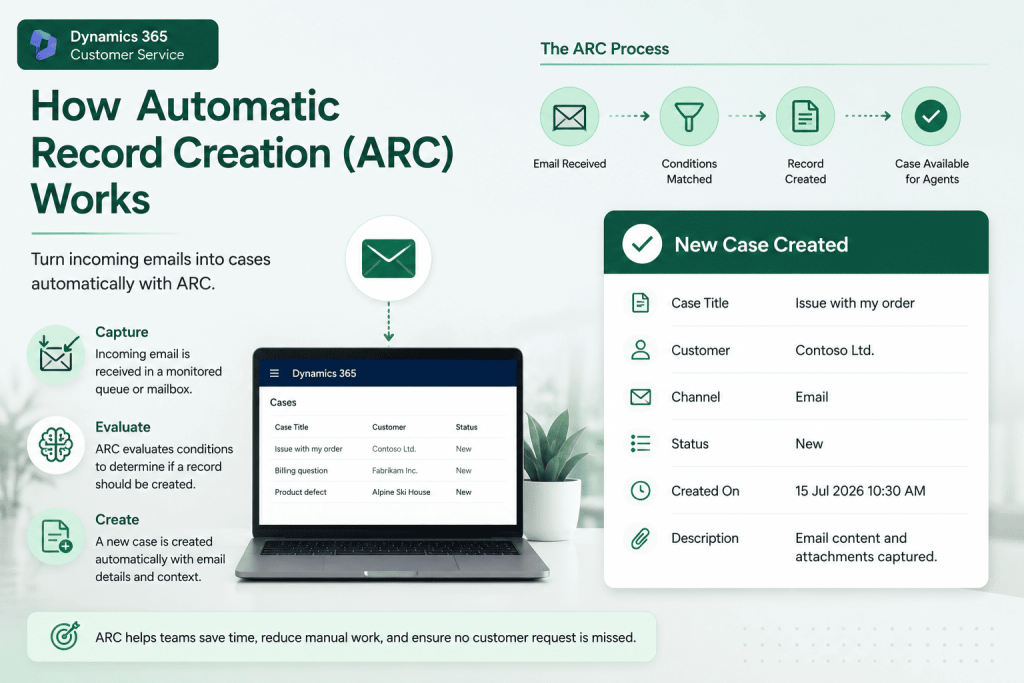
Customer support teams often spend valuable time on repetitive administrative tasks before they can begin resolving customer issues. Reading incoming emails, creating cases, assigning them to the right queue, and sending acknowledgement emails may seem like small tasks individually, but together they consume a significant amount of time every day.
Automatic Record Creation (ARC) in Dynamics 365 Customer Service helps eliminate much of this manual effort by automatically creating records from incoming emails and triggering business processes behind the scenes. It allows organisations to respond to customers faster while ensuring every request follows a consistent workflow.
What is Automatic Record Creation?
Automatic Record Creation is a feature that monitors emails arriving in a configured queue and automatically converts them into Dynamics 365 records, most commonly support cases. Instead of waiting for a service agent to manually review each email, ARC processes it as soon as it arrives and applies predefined business logic.
This not only reduces administrative work but also ensures that customer enquiries are handled consistently, regardless of who is on shift or how busy the support team may be.
More than just creating a case
Although the name suggests that ARC simply creates records, its capabilities extend much further.
Once an email satisfies the configured conditions, ARC can automatically assign the case to a queue, send an acknowledgement email to the customer, populate specific fields, trigger Power Automate flows, or initiate additional business processes. This enables organisations to automate the first stage of their customer service journey without requiring manual intervention.
Because these actions occur immediately after an email is received, support teams can begin working on customer issues much sooner.
Combining ARC with AI
One of the most valuable enhancements to ARC is its ability to work alongside AI-powered Email Classification.
Rather than relying on subject line keywords, ARC can use the Email Category (AI) generated by Dynamics 365 to make routing decisions. This allows the system to understand the intent behind an email instead of simply searching for specific words.
For example, if a customer reports that they’re unable to access an application after a recent update, Dynamics 365 can classify the email as Technical Support. ARC can then create the case, assign it to the correct support queue, and trigger any required automation without requiring a support agent to review the email first.
This combination of AI and automation creates a far more reliable routing process than traditional keyword-based rules.
Why organisations are adopting ARC
As organisations grow, manually processing every customer email becomes increasingly difficult. Delays in case creation can affect response times, while inconsistent manual processes may lead to cases being assigned to the wrong team.
ARC addresses these challenges by standardising the process from the moment an email enters the system. Every customer request follows the same workflow, reducing manual errors while improving operational efficiency.
It also allows support teams to focus on solving customer problems rather than performing repetitive administrative tasks, ultimately leading to a better experience for both agents and customers.
Best practices for implementation
The effectiveness of ARC depends on how well it’s configured. Rather than creating numerous complex rules, it’s often better to design a smaller number of clear and maintainable rules that align with your business processes.
Where possible, combine ARC with modern AI capabilities such as Email Classification and Unified Routing instead of relying solely on subject keywords. This approach provides greater flexibility and improves routing accuracy as customer enquiries become more varied.
It’s also important to regularly review the Activity Monitor to ensure ARC rules are functioning as expected and to identify any emails that may not have been processed correctly.
Final Thoughts
Automatic Record Creation is one of the most practical automation features available in Dynamics 365 Customer Service. While its primary purpose is to create records automatically, its real value lies in streamlining the entire intake process for customer enquiries.
When combined with AI-powered capabilities such as Email Classification, ARC enables organisations to build intelligent support processes that are faster, more consistent, and significantly easier to manage. For businesses looking to modernise their customer service operations, it remains one of the simplest features to implement while delivering immediate operational benefits.