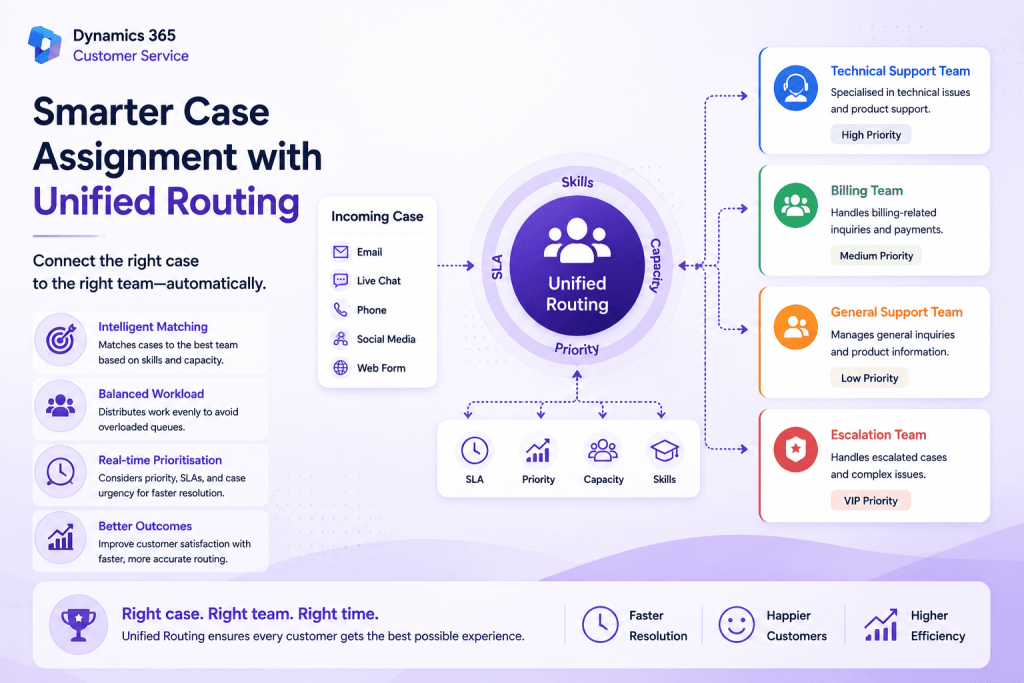
Getting a customer enquiry to the right support agent is just as important as creating the case itself. Even if cases are created automatically, assigning them manually can slow down response times and lead to an uneven distribution of work across the team.
Unified Routing in Dynamics 365 Customer Service addresses this challenge by intelligently assigning work items to the most suitable agent based on predefined rules, agent availability, skills, capacity, and other routing criteria. Instead of relying on manual allocation, organisations can ensure that every case reaches the right person at the right time.
What is Unified Routing?
Unified Routing is Microsoft’s intelligent work distribution engine for Dynamics 365 Customer Service. It automatically evaluates incoming work items, such as cases, chats, and other service requests, before determining the best destination based on your routing configuration.
Rather than assigning work on a simple round-robin basis, Unified Routing considers multiple factors to improve both customer experience and agent productivity. This helps organisations balance workloads while ensuring customers are connected with the most appropriate support resource.
How does it work?
When a new case is created, Unified Routing evaluates the work item against the routing rules configured within Customer Service. Depending on your setup, it can prioritise cases based on urgency, assign work according to agent skills, or distribute cases according to each agent’s current capacity.
For example, imagine two technical support engineers are available. One is already handling several complex cases, while the other has capacity for additional work. Instead of assigning the next case randomly, Unified Routing automatically directs it to the available engineer, creating a more balanced workload without any manual intervention.
Building an intelligent support process
Unified Routing becomes even more powerful when combined with other Dynamics 365 capabilities.
A customer sends an email describing a login issue. Email Classification analyses the content and identifies it as a technical support request. Automatic Record Creation (ARC) immediately creates a case from the email. Finally, Unified Routing evaluates the newly created case and assigns it to the most suitable support agent based on your routing rules.
From the customer’s perspective, the entire process happens seamlessly. Behind the scenes, Dynamics 365 has classified the enquiry, created the case, and delivered it to the right team without requiring anyone to manually review or assign the request.
Why organisations are adopting Unified Routing
As support operations grow, manually assigning cases becomes increasingly difficult. Different agents have different skill sets, varying workloads, and changing availability throughout the day. A simple queue-based approach often results in delays, uneven workloads, and inconsistent customer experiences.
Unified Routing removes much of this complexity by automating the decision-making process. Cases are assigned consistently according to business rules, allowing managers to focus on service quality rather than manually distributing work.
The result is faster response times, better workload management, and improved utilisation of support resources.
Best practices
The success of Unified Routing depends on thoughtful planning rather than complicated configuration. Organisations should begin by clearly defining their queues, identifying the skills required for different types of enquiries, and ensuring routing rules align with their business processes.
It’s also important to review routing performance regularly. As support teams grow or customer enquiry patterns change, refining routing rules helps maintain efficient case distribution and ensures the system continues to deliver the best possible outcomes.
Final Thoughts
Unified Routing is much more than an automatic assignment tool. It provides the intelligence required to deliver customer enquiries to the most appropriate support agent while balancing workloads across the team.
When used alongside Email Classification and Automatic Record Creation, it forms the final piece of an intelligent customer service workflow. Together, these features enable organisations to automate the journey from the moment an email arrives through to the point where the right agent begins resolving the customer’s issue.